Today

What needs you today, before you take on anything else.

Attention items and assigned work in one queue. Overdue and due-soon work made visible, notifications and reminders that mean something, and queues scoped to what your role is actually responsible for.

The problem

Most people do not lose the working day to a lack of tasks. They lose it to a lack of triage. Work arrives from a client, a colleague, an automated rule, and a payment promise, and all of it lands in slightly different places — a message thread, a project view, a notification drawer, a mental list. The result is an afternoon spent reconstructing priorities instead of doing them, and the most overdue item is reliably the one that surfaces last. The real question is never "what is there?" It is "given what is already late, what should I do first?"

Works with: Customer → Opportunity → Quote → Project → Work → Invoice → Payment

How you use it

A working day, start to finish.

  1. Open Today and read the working day in one list

    Everything that needs a decision or a piece of work appears together, rather than being spread across project views, inboxes, and notification trays. The list is built from what has already been entered — tasks, follow-ups, and project status — so it does not have to be maintained by anyone to stay accurate.

  2. Clear overdue work before accepting new work

    Overdue and due-soon items are visible as such, which makes it possible to deal with what has already slipped before taking on more. This is a deliberate order of operations: a queue that only ever grows is how a small team quietly loses a week while appearing busy.

  3. Work the queue that belongs to your role

    Queues are scoped by role, so a delivery member reads their assigned work while an admin reads what the whole operation owes. The scoping means each person opens a short, honest list instead of a filtered view of everything in the business.

  4. Act on the notification, then dismiss it

    Notifications and reminders stay attached to the thing that caused them, so a nudge is a link to context rather than a dead-end alert. That is the difference between a notification you act on and one you swipe away without reading.

  5. See the promises that affect the day

    A payment promise and a project’s status are part of the same picture. Knowing that work is waiting on money, or that a client is waiting on delivery, changes what gets done first — and that context is on the surface rather than in a separate report.

What changes

What is different in practice.

The day starts from what is already late, not from whatever arrived most recently.

Nobody has to maintain a personal to-do list to know what they owe, because the list is built from the work already entered.

An item that says it is overdue is genuinely overdue, rather than a due date nobody has reviewed in a month.

Notifications lead back to the thing that caused them, so acting on one does not require a second search.

Queue length per person becomes visible, which makes an overloaded week something you can see before it becomes a missed deadline.

Product proof

From the current NoxOrigin app.

Real captures, not marketing mockups. Configuration and availability are confirmed during setup rather than promised on a page.

NoxOrigin Today workspace showing money to collect, a scope decision that needs review, and completed work mapped to commercial scope ready to bill.
Money to collect, work that needs a decision, and delivery ready to bill — on one operating screen.Current NoxOrigin app — Today.
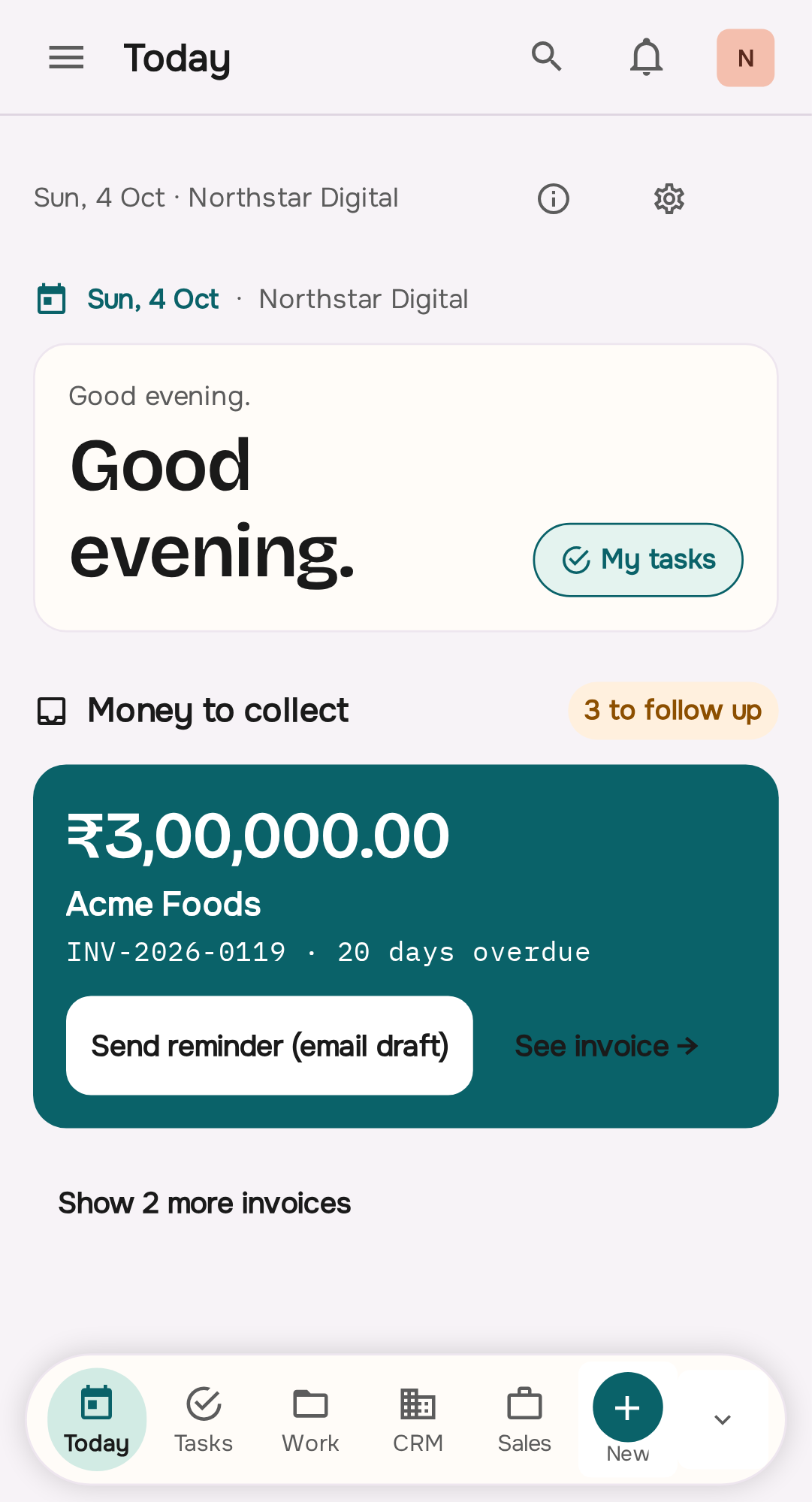
NoxOrigin mobile Today screen with the workspace shell, attention items and bottom navigation.
The same operating record on the phone, with the shell and quick create in reach.Current NoxOrigin app — Today on mobile.
Who uses it

Roles, and what each one needs.

  • MemberA short, accurate queue of what they owe today, and enough context on each item to act without asking.
  • AdminThe operation’s view across people: who is behind, what is late, and where the week is going to break.
  • OwnerTo see and change who can view and reallocate the queues themselves.
Scenarios

Three ordinary situations, described honestly.

These are illustrative workflows, not customer results. We do not publish outcome claims without approved customer material.

The week that started already broken

Three items were due yesterday and two are due today. Because overdue and due-soon work is separated from everything else, the morning is spent on what has already slipped rather than on whatever arrived most recently. No one had to build that list — it came from the tasks and due dates that were already entered.

The person who never clears their queue

A team member’s list grows until they stop opening it. Because the queue is scoped to their assignments and the load is visible to an admin, this shows up as a distribution problem rather than as a surprise the week a deadline is missed. It is still a management conversation — the system only makes it a visible one.

The reminder with nothing behind it

An alert arrives with nothing behind it, so it is dismissed and forgotten. With the notification linked to the task or follow-up that produced it, the same alert is a link to the item, its client, and its due date — which is the difference between acting on it and swiping it away.

Before you start

The parts that need a decision.

Every part of NoxOrigin has awkward edges. Naming them now is cheaper than discovering them in month two.

  • A queue nobody clears is a queue that stops being read. The system assembles the list accurately, but it cannot make someone work it — the habit of ending the day on the queue is what keeps it short enough to trust.
  • Items appear in Today because something says they need attention, which means the details have to be kept honest. A task with no owner and no date tells nobody anything, and it will show up as noise rather than as work.
  • Notifications only stay useful while they are rarer than the alternative. If everything is announced, everything is dismissed, and the items that genuinely needed a human are lost with the rest.
  • Role-scoped queues require agreeing what each role is responsible for. If queues overlap heavily, the scoping is decorative and people filter the list themselves again.
  • Too much in one day is a workload problem, not a software problem. Today makes the backlog visible; it does not create capacity, and teams sometimes need to be told that plainly before rollout.
Questions

What people ask before they start.

Is Today a separate product from Projects & Work?

No. Today is a view over the same system and the same work — over tasks, follow-ups, notifications, and project status — rather than a second thing to keep in sync.

Do I have to update a to-do list as well?

That is the point. The list is built from work that already has owners and due dates, so keeping a parallel personal list is optional rather than required.

Can I see only my own work?

Yes. Queues are scoped by role, so a member reads their assigned work and an admin reads what the whole operation owes. Which items land in which queue is agreed during setup.

What appears in the attention list?

Items that need a decision or a piece of work: assigned tasks, due and overdue follow-ups, and notifications raised against the work you have access to.

Does this work on mobile?

Yes. The same list adapts to the mobile app, with bottom navigation and quick create for people who are away from a desk when the day changes.